Webull MCP Server: Why the ChatGPT Connector and the Local Server Are Two Different Doors
Webull's MCP server comes in two forms. The hosted connector drafts orders you confirm in the app; the local server places them directly. What that means.
There are two Webull MCP servers, and they don’t grant the same access. Cloud MCP at api.webull.com/mcp is the one behind the ChatGPT, Claude and Grok connectors. You sign in with OAuth, and the order tools only create an instruction that “requires confirmation in Webull APP / Desktop”. Local MCP runs on your own machine with an App Key and App Secret, and its order tools, such as place_stock_order, submit orders directly. Both carry the same brand name. They’re built on different consent models.
Under one brand name, they are easy to read as one capability. This page is about the difference between them and nothing else. Before going further: this desk has no Webull account and has not connected to either server. Everything below comes from Webull’s own developer documentation and product pages, read on 23 September 2026. We have no affiliate or commercial relationship with Webull or with any other broker named here.
What Webull actually ships: four surfaces, one account
Webull’s announcement of 4 August 2026, published in its own newsroom, lists “native connectors for ChatGPT, Claude and Grok, the launch of Webull Command Line Interface (‘CLI’), and an enhanced suite of Webull Model Context Protocol (‘MCP’) skills,” and describes these as building on its “recently launched MCP server”. Its agentic page, webull.com/agentic, groups them into a hosted connection plus a “local deployment” toolkit: “Local MCP”, “Agent Skills” and “CLI”.
The line that matters runs between the first two. Here is how Webull’s own docs describe each:
| Cloud MCP (the ChatGPT / Claude / Grok connector) | Local MCP | |
|---|---|---|
| Where it runs | “a fully managed MCP service hosted by Webull” | Your machine: “your AI client will automatically download and launch it via uvx” |
| How you authorise it | “OAuth Authorization Code Flow” with password plus trading password | App Key and App Secret, placed in your AI client’s config file |
| Account scope | “Users may authorize one or more accounts… Only selected accounts will be accessible through MCP.” | Every account the API credentials reach; the docs name no per-account selector |
| Capability scope | “Users may authorize capability groups independently”, described as following “the Principle of Least Privilege” | WEBULL_TOOLSETS, default “all enabled”; “set WEBULL_TOOLSETS=account,market-data to disable trading tools” |
| Order path | place_stock_instruction and similar tools: “requires confirmation in Webull APP / Desktop” |
place_stock_order, replace_stock_order, cancel_order and similar tools act directly |
| Built-in limits | None documented as settings | WEBULL_MAX_ORDER_NOTIONAL_USD default 10000; WEBULL_MAX_ORDER_QUANTITY default 1000; WEBULL_SYMBOL_WHITELIST default “no restriction” |
| Default environment | No sandbox setting documented; you authorise real accounts | WEBULL_ENVIRONMENT default uat (sandbox) |
| Tools listed | 80 | 86 |
Every quoted cell is Webull’s own wording, from developer.webull.com (the “Webull Cloud MCP Server” and “Webull Local MCP Server” pages) or webull.com/agentic. The unquoted cells are our reading of what those docs do and don’t say.
The finding: the consumer connector is the more restricted door
Most people would guess the opposite. You’d expect a connector you click on inside ChatGPT to be the permissive, convenient option, and a server you install yourself to be the careful one. Webull’s documentation shows the reverse.
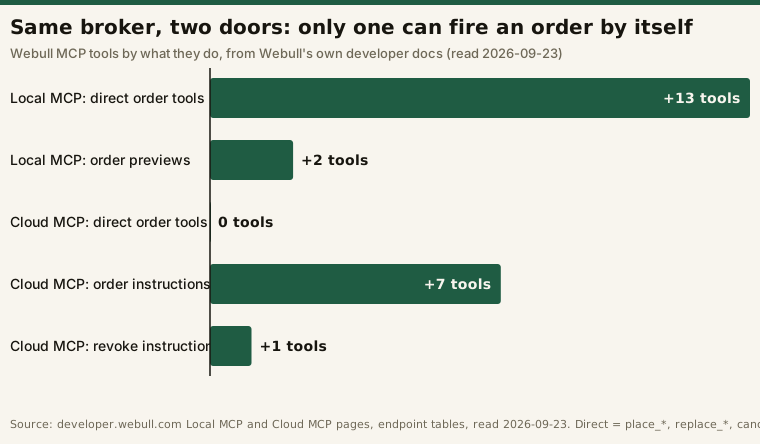
We sorted both endpoint tables by what each tool does. The method, run on the tool names exactly as the two doc pages list them:
# Illustrative: the classification applied to the two endpoint tables on
# developer.webull.com (Local MCP: 86 tools, Cloud MCP: 80 tools), read 2026-09-23.
def classify(tool):
    if tool.endswith("_instruction") and tool.startswith("place_"):
        return "order instruction (confirm in Webull app)"
    if tool.startswith(("place_", "replace_")) or tool == "cancel_order":
        return "direct order"
    if tool.startswith("preview_"):
        return "order preview"
    return "other (reads, watchlists, instruction status)"

# Local MCP -> direct order 13, order preview 2
# Cloud MCP -> direct order 0, order instruction 7, plus revoke_instruction 1| Tool group | Local MCP | Cloud MCP |
|---|---|---|
Direct order tools (place_*, replace_*, cancel_order) |
13 | 0 |
| Order previews | 2 | 0 |
| Order instructions needing confirmation in the Webull app | 0 | 7 |
Instruction management (revoke_instruction, pending/processed reads) |
0 | 3 |
| Watchlist writes | 6 | 6 |
| Everything else: market data, research, account and order reads | 65 | 64 |
| Total listed | 86 | 80 |
Webull’s press release is consistent with that split. For the ChatGPT, Claude and Grok connectors it lists account balances, positions, market data, watchlists, open orders and order history, with no order placement. For the CLI it says users can “Trade stocks, options, futures, cryptocurrencies, and event contracts”. The execute-directly surfaces are the ones you run yourself.
Why the difference is a consent question, not a feature list
Our broker MCP servers explainer sorts every server into three permission bands: read-only, order entry and funds movement. Webull’s two doors show that “order entry” itself splits in two.
- Order instruction, confirmed out of band. The model can draft an order but can’t make it live. A human has to act in a separate app that the model never touches. The trust boundary runs through your phone.
- Direct order entry, bounded by config. The model can submit orders itself. The only things limiting it are the values in an environment block you wrote, such as the notional cap, the quantity cap and the symbol whitelist, plus whatever the calling client asks you before it runs a tool.
The two differ in who holds the credential, too. With Cloud MCP, “your credentials stay with Webull”, in the agentic page’s words, and the AI platform works from an OAuth authorisation. With Local MCP, the App Secret sits in a plain config file on your machine. Webull’s Local MCP doc warns that these credentials “should only be passed to the MCP Server process via the env field in mcp.json, never as conversation content”.
So the connector puts the broker’s app between the model and the market. The local server replaces that step with settings you control, and three of its defaults are worth checking before a first run. The environment variable defaults to the uat sandbox, but the sample configs on the same doc page already set prod, so a copy-paste setup starts live. The notional cap defaults to 10,000 USD per order, not zero. And the symbol whitelist defaults to no restriction at all.
Webull isn’t the only broker using the instruction model
Interactive Brokers’ AI-integrations page (read 2026-09-23) describes the same instruction-first design as Webull’s connector, stated more bluntly: the AI can “generate trade instructions. When you are ready to trade, open the AI Instructions tab in any IBKR platform to review and submit your order,” and “Instructions never become orders automatically.” Its public MCP endpoint is api.ibkr.com/v1/api/mcp-public.
Robinhood’s server takes the direct route. When we connected to it on 5 September 2026, its tool list included place_* order tools paired with preview tools. The full surface is in our Robinhood MCP desk test.
| Surface | Can the model make an order live by itself? | Stated on |
|---|---|---|
| Webull Cloud MCP (ChatGPT / Claude / Grok connector) | No: the instruction “requires confirmation in Webull APP / Desktop” | developer.webull.com, Cloud MCP page |
| Webull Local MCP | Yes, within WEBULL_MAX_ORDER_* and whitelist settings |
developer.webull.com, Local MCP page |
| Interactive Brokers MCP | No: “Instructions never become orders automatically” | interactivebrokers.com, AI integrations page |
| Robinhood trading MCP | Yes: place_* tools, with a preview step documented alongside |
Our 2026-09-05 session, desk test |
We’ve kept this table to surfaces whose documentation we read first-hand. Third-party roundups make claims about other brokers, including one said to limit its AI integration to read-only. We couldn’t confirm those on the brokers’ own pages this session, so they aren’t in the table. A broker-by-broker ranking isn’t the point of this page anyway.
Questions to ask before you connect either one
- Which Webull surface is this? Is it the hosted URL (
api.webull.com/mcp) or a localuvx webull-openapi-mcpprocess? The answer tells you whether a model can place orders by itself. - What did I grant on the authorisation screen? On Cloud MCP, check which accounts and which capability groups you ticked. On Local MCP, check what
WEBULL_TOOLSETSsays. - Are the local limits set to numbers I chose? Look at the notional cap, the quantity cap and the whitelist, and don’t leave them at their defaults.
- Where does revocation happen? Cloud MCP runs on an OAuth grant. Local MCP runs on API credentials you’d have to rotate.
The operational side, meaning kill switches, logging and what goes wrong when nobody is watching, is covered in running an autonomous trading agent. What the regulator expects of the broker’s side is in our read of FINRA’s 2026 report on AI agents.
Frequently asked questions
Does Webull have an official MCP server?
Yes, two of them. Webull documents a hosted Cloud MCP server at https://api.webull.com/mcp, which you connect to over OAuth, and a Local MCP server, webull-openapi-mcp, which runs on your own machine via uvx using API credentials. Both are on developer.webull.com.
Can ChatGPT or Claude place trades in my Webull account?
According to Webull’s Cloud MCP documentation, the connector’s order tools create order instructions that require confirmation in the Webull app or desktop platform. The model drafts the order and you make it live. The Local MCP server is different: its documented tools place orders directly.
Is the Webull MCP server read-only?
Not by default. Cloud MCP lets you authorise capability groups one at a time. Local MCP enables every toolset unless you set WEBULL_TOOLSETS=account,market-data, which Webull’s docs give as the read-only configuration.
What limits does the Webull Local MCP server apply to orders?
Webull’s docs list WEBULL_MAX_ORDER_NOTIONAL_USD (default 10000), WEBULL_MAX_ORDER_QUANTITY (default 1000) and WEBULL_SYMBOL_WHITELIST (default no restriction). The environment setting defaults to the uat sandbox, though the doc’s own sample configs set prod.
Have you tested Webull’s MCP server?
No. This desk has no Webull account, so this page is a documentation reading, not a test. For a first-hand session with a broker MCP server, see our Robinhood MCP desk test.
Sources read 23 September 2026, first-party: developer.webull.com (“Webull Cloud MCP Server”, “Webull Local MCP Server”), webull.com/agentic, Webull’s 4 August 2026 newsroom release, and interactivebrokers.com’s AI integrations page. Tool counts are from the endpoint tables on the two Webull doc pages as published that day, and they will change as Webull adds tools.
This is educational content, not financial advice. Nothing here recommends connecting an AI agent to a brokerage account, or using any broker named.