AI Stock Screeners: What Plain-English Filters Can't Fix
An AI stock screener changes how a screen is written, not what a screen can know. Five limits that survive natural-language filtering, and the fixes.
An AI stock screener changes how a screen is specified, not what a screen can know. You describe what you want in ordinary language instead of assembling filter boxes, and the platform translates that into the same database query it always ran — a snapshot of names matching your conditions, carrying no opinion about any of them, and blind to anything the underlying data does not contain.
Removing the translation step between an idea and a filter set is a genuine convenience, and none of what follows says otherwise. It says where the limits live: they are properties of screening, not of the interface, so a natural-language layer cannot remove any of the five below.
Limit 1: a screen is a snapshot, and language does not make it a monitor
Ask a screener in plain English for “stocks breaking out of a three-week range on heavy volume” and you get the list that matched at the instant the query ran. An hour later it is a different list. Nothing is being watched on your behalf.
This is the same property a manually built screen has, but plain English makes it easier to forget, because the request sounds continuous. “Show me stocks that are breaking out” reads like a standing instruction. It is a single query. If you want continuous observation you need alerts, which are a separate product surface with their own limits and their own pricing.
The practical consequence is about timing rather than features: the value of a screen depends heavily on when in the session you run it, and a natural-language interface gives you no help with that. We cover what a screener is and is not built to do in what a stock screener actually does.
Limit 2: the data ceiling is unchanged, and it is usually the real constraint
A filter box tells you what exists — you can see the field list, and a field you need that is not there is visibly absent. A text prompt accepts any sentence you type.
That is the whole of this limit. A screen can only filter on fields the platform stores: if the feed carries delayed quotes, a plain-English request for real-time conditions returns delayed results without saying so; if fundamentals update on filing schedules, “companies whose margins are improving” means “whose last filed margins were higher than the ones before”, which may be months stale; if the platform does not carry short interest, no phrasing conjures it. Ask for something the data cannot support and you generally do not get an error. You get a plausible screen built from whatever fields the model could map your words onto, and the gap between what you asked for and what ran is invisible. A field being listed is not even the same as a field being populated: replicating a screen day after day, we watched a market-cap gate whose only observed effect was silently deleting names whose metadata happened to be missing at that moment, written up as the run-timestamp problem.
We have watched a language layer perform exactly that substitution, on a different product. Running a third-party TradingView MCP server on this desk, a request for the US ETF AMEX:SPY came back tagged "exchange": "kucoin", and a Bollinger scan silently returned a KuCoin crypto universe rather than US equities; the session is written up in our MCP desk test. An MCP server is not a screener, but the failure mode transfers: a layer that maps your words onto fields will map them onto something, and it does not report the substitution.
The check that catches this: after any AI-generated screen, read the filter set it produced, field by field, before you look at the results. If the platform will not show you the filters it built, you cannot audit the answer, and you should treat the output as a suggestion rather than as a query result.
Limit 3: ambiguity gets resolved silently, and the resolution is the whole screen
Trading language is imprecise in ways that matter enormously to a query. “Oversold” is RSI below 30 to one person and below 20 to another, on a 14-period lookback or a 2-period one. “Near its highs” could be within 2% of the 52-week high, or above the 20-day. “High volume” is relative to what baseline, over what window?
The model has to pick. It will pick something reasonable, and reasonable is not the same as yours — and the size of that gap is measurable. Take a single 20-bar close series and ask the three common readings of “oversold” whether it qualifies. Every value below is Wilder’s RSI computed on the same bars; only the lookback and the threshold change.
# Illustrative — synthetic close series, not market data. Wilder RSI, no smoothing shortcuts.
closes = [100, 101, 100.5, 101.5, 101, 102, 101.5, 102.5, 102, 103,
          102.5, 103.5, 103, 104, 103.5, 104.5, 104, 103.2, 101.4, 99.6]

def rsi(closes, period):
    gains = losses = 0.0
    for i in range(1, period + 1):                 # seed: simple average of the first `period` moves
        d = closes[i] - closes[i - 1]
        gains += max(d, 0.0); losses += max(-d, 0.0)
    ag, al = gains / period, losses / period
    for i in range(period + 1, len(closes)):       # then Wilder smoothing
        d = closes[i] - closes[i - 1]
        ag = (ag * (period - 1) + max(d, 0.0)) / period
        al = (al * (period - 1) + max(-d, 0.0)) / period
    return 100.0 if al == 0 else 100 - 100 / (1 + ag / al)

[round(rsi(closes, p), 1) for p in (2, 7, 14)] # -> [2.7, 28.9, 44.4]| Reading of “oversold” | RSI value on this series | Does the screen match? |
|---|---|---|
| RSI(14) below 30 | 44.4 | No |
| RSI(14) below 20 | 44.4 | No |
| RSI(7) below 30 | 28.9 | Yes |
| RSI(2) below 20 | 2.7 | Yes |
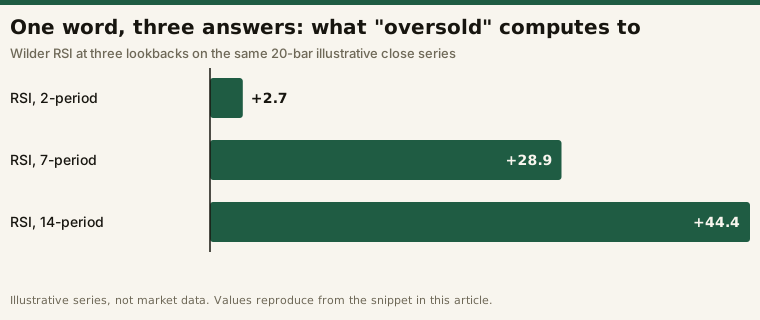
Same word, same bars, opposite answers. On a real universe that is the difference between a screen returning nothing and a screen returning a page of names, and nothing on the results page tells you which reading ran. Two people typing the same sentence — or the same person typing it on two different days — can get materially different screens, and neither is told which choice was made unless they inspect the filters.
This is a real reversal of the discipline that makes screening useful. The habit that separates a screen from a search for confirmation is writing the specification down before running it, so today’s list and next month’s list came from the same rule. A prompt that gets silently re-interpreted is a specification you do not control and cannot reproduce. The fix is not to avoid the feature — it is to treat the generated filter set, not your sentence, as the specification, and to save it.
Limit 4: it removes friction from the wrong activity
Every added condition shrinks the output, and it is tempting to keep adding until the list is comfortably short. What you have done is fit the filter set to recent history: the survivors match a very specific description that happened to occur lately, and there is no reason it recurs.
Natural language accelerates exactly this. Iterating a screen used to mean clicking through filter panels, and that friction imposed a small tax on aimless tinkering. Now it costs a sentence. Ten rephrasings until a list looks appealing is ten searches for a satisfying answer, and the interface presents the tenth identically to the first.
There is no software defence against this. The only defence is procedural: fix the screen, date it, and change it deliberately rather than continuously — the same reasoning behind our tool trial protocol, which exists to stop a tool evaluation from drifting into a search for a result we liked.
Limit 5: it still has no opinion, and it now sounds like it does
This is the limit that matters most, and it is the one created purely by the interface.
A filter panel looks like what it is — a query builder. A conversational surface carries the connotations of every other conversational tool you use, which answer questions and offer judgments. When a screener returns five names in response to a sentence, the presentation implies a recommendation that the underlying mechanism does not support. The system matched conditions. It does not know whether any of those names is worth trading, and it has no view on that.
Vendors are, to their credit, often explicit about this in their own documentation — TradingView’s AI Screener announcement, for instance, says its results serve as a starting point for research rather than as financial advice, a point we go through in what a plain-English screen actually builds. The disclaimer is correct. It is also up against an interface that suggests otherwise every time you use it.
What is genuinely better
Being sceptical about the limits is not the same as saying the feature is worthless. Three things are real gains.
Discovery of the filter set. If you do not know a platform’s field vocabulary, describing what you want and reading what it built is a fast way to learn what is available. This is the strongest use of the feature and it is underrated.
Faster first drafts. Getting from an idea to a roughly correct filter set in one step, then tuning by hand, is quicker than building from scratch. The key word is then — the AI step is a starting point, not the finished screen.
Lower barrier to entry. People who would never have built a multi-condition screen now run one. That is a genuine widening of access, with the caveat that the people helped most are the least equipped to notice when the generated filters do not match what they asked for.
The artefact to save
Not the sentence. This:
  screen:        "oversold large caps"
  universe:      market_cap > 10B
- rsi_period:    14
- rsi_threshold: 30
+ rsi_period:    2
+ rsi_threshold: 20
Four lines, and they are the entire difference between the two screens in Limit 3 — one that matched nothing on our series and one that matched. That block is reproducible, diffable and arguable. The prompt that generated it is none of those things, because the same prompt can produce either side of the diff.
Three habits follow from it:
- Read the generated filters every time. If the platform will not show them, downgrade your trust in the output accordingly.
- Save the filter set, not the prompt, and re-run the saved version rather than retyping the sentence.
- Count your rephrasings. If it took nine attempts to get a list you liked, you found a list you liked, not a screen that works.
Where a screener sits in the process
None of this changes the shape of the job. A screener produces a candidate list; the analysis happens elsewhere, and the record of what you decided about each name happens elsewhere again — the chain we lay out in the screener, chart and journal stack and in the journaling guide. A natural-language layer sits at the front of that chain and makes the first step faster to specify. It does not shorten the chain, and the steps it does not touch are the ones that determine whether the screen was worth running.
Frequently asked questions
Are AI stock screeners more accurate than manual ones?
Accuracy is not the axis — a screen returns exactly the names matching its filters, typed or clicked; what the natural-language route adds is an interpretation step that can silently diverge from what you meant.
Can an AI screener find opportunities I would miss?
It can surface names matching a description you would not have known how to filter for, which is genuinely useful when you do not yet know the platform’s field vocabulary.
Should I trust a screener’s ranked or scored output?
Treat any ranking as one more filter whose definition you have not seen, and ask the platform to document what the score is computed from before you let it order your list.
Why do two people get different results from the same screener prompt?
Because the prompt is not the specification: the generated filter set is, and phrases like “oversold” resolve to different lookbacks and thresholds each time, as the RSI example above shows.
Does this mean I should not use one?
No — draft with it, read the filters it built, save those, and run the saved version, which buys the convenience without giving up reproducibility.
This page describes properties of screening tools in general. Where a specific vendor’s behaviour is mentioned it is taken from that vendor’s own documentation and dated at the point of use. Product features change without notice, so check any platform’s current documentation before relying on a description here.
This is educational content about software, not financial advice. Nothing here is a recommendation to trade any security.