TradingView AI Screener: What the Vendor Says It Builds (Untested Here)
TradingView's AI Screener turns plain English into Stock Screener filters. What the vendor's pages say it builds, costs, and may change or withdraw.
TradingView’s AI Screener lets you describe a screen in ordinary language and have the platform set the Stock Screener’s filters for you. It is a filter-building shortcut, not a new kind of analysis — the screen it produces is the same snapshot query the manual screener has always run, and TradingView’s own announcement says the results “serve as a starting point for your own research, not financial advice or recommendations.”
What this page is, precisely: a record of what TradingView says its AI Screener does, quoted from the vendor’s own pages and dated. The feature was announced on the TradingView blog on 17 August 2026 and is a public beta. This desk holds an open 30-day trial on the platform but has recorded no in-platform observation of this feature, so nothing below grades how it performs. When that changes, this page changes with it.
What TradingView says the AI Screener is
The vendor’s announcement post is unusually specific, which makes it easy to state the boundaries without guessing:
- Availability: “All paid plans.” It is not part of the free Basic tier.
- Status: public beta.
- Platform: desktop only — “Mobile isn’t yet supported.”
- Scope: “available exclusively within the Stock Screener, with additional asset classes to follow.” Crypto, forex and the rest are not in it yet.
- Language: requests can be made in any language, with the note that “best results are achieved in English.”
That scope line matters more than it looks. The AI layer sits inside one screener, on one class of instrument, on one form factor. Anyone expecting a general natural-language assistant across the charting product is reading a different feature than the one that shipped.
What a plain-English request actually builds
The mechanism is a translation step, and TradingView describes its most consequential side effect plainly: “Running an AI request replaces any manually set filters (the selected market remains unchanged unless specified in your prompt).”
The AI request is not additive. It does not layer a natural-language condition on top of the liquidity floors and sector exclusions you already set — it replaces the filter set, and the market selection is the only thing that survives untouched unless your prompt says otherwise.
For anyone who works from a fixed, written screen specification, that changes the workflow rather than extending it. A saved manual screen and an AI request are two different entry points to the same result set, and running the second wipes the first from the panel. The practical habit is the one that makes any screener worth running: write the specification down outside the tool, so the filters can be rebuilt exactly rather than remembered approximately.
It changes how a screen is written, not what a screen can know
A screener runs a query against market data and returns the symbols that match, at the instant it ran. That is true whether the conditions were typed into filter boxes or generated from a sentence. The output is still a snapshot rather than a stream, still only as current as the data feed behind it, and still carries no opinion about whether any name on it is worth trading.
What natural-language entry genuinely removes is the specification cost — the part where you know what you want to look for but not which of four filter families the platform filed it under. That is a real friction, and a bigger one for occasional users than for anyone running the same screen daily. What it does not remove is the part where the list is only as good as the description, and the description is still yours. For a fuller treatment of what screeners can and cannot do, see what a stock screener actually is; for the limits a natural-language layer cannot remove no matter how it is phrased, see what plain-English filters can’t fix.
The request balance, and the part that is free
The AI Screener runs on a monthly allowance rather than unlimited use, and the two request types are metered differently:
- Template requests — “Template requests don’t count toward your monthly balance.”
- Custom requests — these draw down the allowance. “Your remaining balance is displayed above the input field and resets on the first of every month.”
So the templates are effectively unmetered and the free-text requests are the scarce resource. The announcement names no fixed number, and the beta clause below is why. We have not read the balance off an account’s own input field, which is where the real figure lives — so treat the allowance as something to check in-product on day one rather than a figure to plan around.
The beta terms are the important small print
TradingView’s own wording on the beta is about as blunt as vendor copy gets: “During the beta, the feature is provided as is,” and “request limits may change, and it may be disabled.”
That is three separate risks in one line — no service commitment, no stable allowance, and no guarantee the feature survives the beta. None of it is a reason to avoid using the AI Screener, but it is a reason not to build a daily process on top of it while the beta lasts. A screen you can only reproduce by asking for it in prose is a screen you lose if the prose input goes away. Keeping the generated filters written down as an explicit specification is the cheap insurance.
It also means anything you read about the feature — including this page — has a short shelf life. The limits described here are the ones the vendor published; the vendor has reserved the right to change them.
What it costs to get to it
Because the AI Screener sits behind “all paid plans,” the cheapest route to it is TradingView’s entry paid tier. Read first-party at tradingview.com/pricing on 3 September 2026:
| Plan | Per month, billed annually | Advertised annual saving vs month-to-month | Free trial |
|---|---|---|---|
| Essential | $12.95 | “Save $24 a year” | “Try free for 30 days” |
| Plus | $29.95 | “Save $60 a year” | “Try free for 30 days” |
| Premium | $59.95 | “Save $120 a year” | “Try free for 30 days” |
| Ultimate | $199.95 | “Save $480 a year” | “Try free for 14 days” |
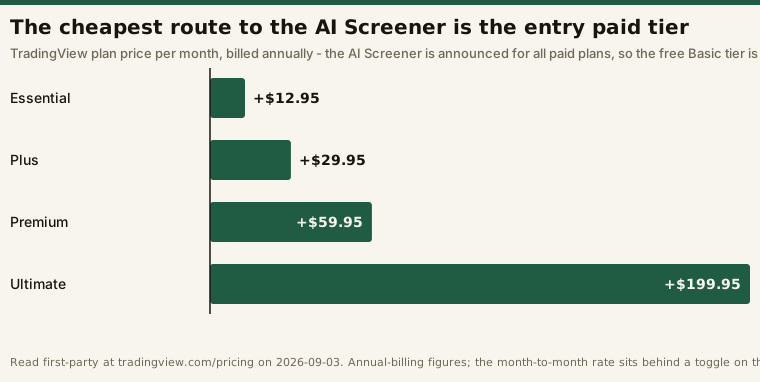
Two cautions on those numbers. First, they are the annual-billing figures; the month-to-month rate sits behind a toggle on the same page and is higher — which is the whole reason third-party summaries of TradingView’s prices have been contradicting each other all year. We take that apart tier by tier in free versus paid; check the current figures on the vendor’s own page before acting on any of them: TradingView.
Second, the pricing page’s own comparison table does not mention the AI Screener at all. The availability claim comes from the announcement post, not from the tier grid — worth confirming in-account before subscribing specifically for it.
Where this desk stands on it
This desk opened a 30-day trial on TradingView’s Essential plan on 2026-08-23, running a fixed daily protocol written before the subscription started. As of the trial log’s 2026-09-02 pass, the in-platform half of that protocol has no rows: the regime read and the momentum screen were both computed off-platform from public data, and no observation of TradingView’s own screener — AI or manual — has been recorded.
So there is no first-hand verdict here. Two specific things stay open until there is one: what filter set a real plain-English prompt actually generates, and what number the request-balance counter shows on an Essential account. Both need someone in front of the product, and both are on the trial’s list. The trial closes 22 September 2026, so if this page still carries no in-platform rows after that date, it has gone stale and should be read as vendor documentation rather than a review.
Do not confuse this with TradingView’s other AI product, the AI Chart Copilot — a separate browser extension that reads the chart in front of you, rather than a query builder inside the site.
What the page can honestly do meanwhile is state the published boundaries accurately: paid plans only, desktop only, stocks only, beta terms that allow the limits to move or the feature to be withdrawn, and a request that overwrites your existing filters when it runs. Those are the facts worth knowing before you type the first sentence into it.
Frequently asked questions
Is the AI Screener available on the free plan?
No. TradingView’s announcement lists it as available on “all paid plans,” which excludes the free Basic tier. The cheapest route is the Essential tier at $12.95 a month billed annually, which carries a 30-day free trial.
Does it work on mobile?
Not currently — the announcement states “Mobile isn’t yet supported.”
Can it screen crypto or forex?
Not yet. It is “available exclusively within the Stock Screener, with additional asset classes to follow.”
Will an AI request keep my existing filters?
No. “Running an AI request replaces any manually set filters,” with the selected market the only thing left unchanged unless your prompt says otherwise. Save any screen you care about as a written specification outside the tool.
How many AI requests do I get per month?
TradingView does not publish a number in the announcement, and we have not read one off an account. Template requests are stated not to count against the balance; custom requests do, and the remaining balance is displayed above the input field and resets on the first of the month.
Have you tested it?
No. Every claim on this page is quoted from TradingView’s own published pages and dated. The desk’s 30-day trial has not yet logged an in-platform session, which is stated above rather than glossed over.
Disclosure: this page contains affiliate links. If you subscribe through one, this site may earn a commission at no additional cost to you. That arrangement does not change what is written above — every vendor claim on this page is quoted from TradingView’s own published pages and dated, and the page explicitly declines to grade a feature it has not used.
This is educational content, not financial advice. A screener output is a list of names matching conditions you specified; it is not a recommendation to trade any of them.