TradingView AI Chart Copilot: Who Publishes It, and the 15-a-Day Cap That Isn't There
TradingView AI Chart Copilot is a free beta Chrome extension. Its install link, its publisher and its real usage limit are not what the guides say.
TradingView’s AI Chart Copilot is a free browser extension in public beta, and the install link on TradingView’s own announcement resolves to a Chrome Web Store listing titled “TradingView Remix: AI Chart Copilot”, published under the website tvremix.xyz. The widely repeated “15 AI requests per day” limit appears in neither primary source: TradingView’s post states no number at all, and the listing it links to advertises a weekly allowance that scales with your TradingView plan.
Neither fact is a scandal. Both are a documentation gap: the guides ranking for this product describe a limit no primary source states, and the name on the thing you install does not match the name in the announcement that sent you there. This page contains no first-hand test — we have not run the extension, and everything below is sourced to a page and dated.
What TradingView’s own announcement says
Read first-party on 17 September 2026 at TradingView’s blog post announcing the beta, which is dated 2 April 2026:
- The product is called TradingView AI Chart Copilot.
- It is a browser extension for Chrome and Chromium browsers, not a feature inside tradingview.com.
- It is open to TradingView users generally; no plan tier is named as a requirement.
- On limits, the post says exactly one thing: “Please note that to keep it sustainable and free, we may limit daily usage.” No number. No tier. No word “Remix” anywhere in the prose.
- Native integration into the TradingView side panel and desktop app is described as future work, not as shipped.
That is the entire first-party record on usage limits. One sentence, no figure.
Where the install link actually goes
The announcement’s Chrome Web Store link and its install button both resolve to the same listing, chromewebstore.google.com/detail/tradingview-remix-ai-char/fchmejnoncmdhlebgdgifdnehoibalnd, read live on 17 September 2026. On that listing:
| Field | What the Chrome Web Store shows, 17 September 2026 |
|---|---|
| Extension name | TradingView Remix: AI Chart Copilot |
| Offered by | The owner of the listed website, tvremix.xyz |
| Developer contact | w0rse.t@gmail.com |
| Version | 0.18.7 |
| Last updated | 16 September 2026 |
| Users | 100,000 |
So there is one extension, not two, and TradingView’s own post installs it. That matters because the alternative reading — that the review ecosystem is pointing readers at somebody else’s lookalike — is the failure mode this desk has documented before, when the obvious install for a “TradingView MCP” server turned out to be a different author’s package. It is not what is happening here. The install path from TradingView’s own page is the listing above.
What has not happened is TradingView updating its announcement to match. The word “Remix” appears nowhere in the post’s prose — only inside the install URL it hands you — and the post never names the publisher and never mentions the plan-scaled allowance the listing advertises. Meanwhile tvremix.xyz, read the same day, brands itself “Official TradingView extension — Public Beta”, states in its FAQ “This is the official TradingView AI Chart Copilot — the same product TradingView introduced in our blog”, and says it was “Built in close collaboration with TradingView and designed to graduate into the native TradingView experience after the public beta.” Its footer carries no company name or address.
We are not characterising any of that as good or bad, and this site is not asserting that the extension is unofficial, unsafe or unendorsed — TradingView’s own post links to it, which is about as clear an endorsement signal as a link can be. The point is narrower and practical: the name, the publisher and the limits differ between the page that announces the product and the page that ships it, and a reader who only sees one of the two walks away with a wrong detail.
The limit, from four sources that disagree
This is the part worth the two minutes, because the number most guides print is not in either primary source.
| Source | What it says about limits | Read |
|---|---|---|
| TradingView blog announcement | “to keep it sustainable and free, we may limit daily usage” — no figure | 17 Sep 2026 |
| Chrome Web Store listing | “Free during Public Beta. Every user gets a weekly usage limit that scales with their TradingView plan: Free 0.25x, Essential 1x, Plus 2x, Premium 5x, Ultimate 20x.” | 17 Sep 2026 |
| tvremix.xyz — the publisher named on that listing | “Weekly limit scales with your TradingView plan: Free 0.25×, Essential 1×, Plus 2×, Premium 5×, Ultimate 0.25×. Free tier excludes Pine coding.” | 17 Sep 2026 |
| Pineify blog, “15-Request Cap and What Comes Next” | “During the beta, you get 15 AI requests per day for free.” | 17 Sep 2026 |
The last row is quoted as the claim being corrected, not as an authority; the two middle rows are both primary and still do not agree with each other. A daily cap of 15 requests appears nowhere in TradingView’s announcement and nowhere on the listing that announcement links to. The listing describes a weekly allowance expressed as a multiplier, which is a different unit, a different period and a different structure.
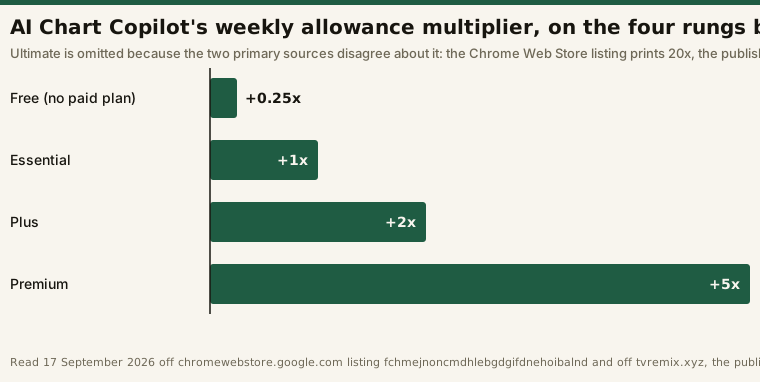
The two primary sources disagree about the top rung
Read on the same day, the Chrome Web Store listing and the site named as its publisher print the same first four rungs and different fifth ones — 20x against 0.25×, a factor of eighty apart on the most expensive plan on the ladder. Neither page acknowledges the other, and nothing on either one says which is the typo. So the Ultimate multiplier is unresolved, and this page will not pick the larger number to make an upgrade look better.
Why the ladder cannot be turned into a number of requests either
Even on the four rungs that agree, the multipliers are relative to a base neither source publishes, so the arithmetic you would want to do stops one step short:
# Illustrative. The ladder is printed; the unit it multiplies is not, and the sources conflict.
cws     = {"Free": 0.25, "Essential": 1, "Plus": 2, "Premium": 5, "Ultimate": 20.0}   # store listing
tvremix = {"Free": 0.25, "Essential": 1, "Plus": 2, "Premium": 5, "Ultimate": 0.25}   # publisher site

[k for k in cws if cws[k] != tvremix[k]]        # -> ['Ultimate']   the only disputed rung
cws["Ultimate"] / tvremix["Ultimate"]           # -> 80.0   how far apart the two sources are

cws["Premium"] / cws["Essential"]               # ->  5.0   agreed, and therefore quotable
base_requests_per_week = None                   # not published on any source
cws["Essential"] * base_requests_per_week       # -> TypeError: nothing to multiply
So the honest reading is narrow: Premium is five times Essential’s weekly allowance, and Essential four times the no-paid-plan one. How many prompts any of those is, nobody has published — which is also why “15 per day” cannot simply be restated as “105 per week”.
One more thing the listing states and the announcement does not: the analysis features are available on the free tier, while “the Pine code authoring assistant is reserved for Essential and above.” If Pine Script help is the reason you want this, that is the line that decides whether a paid plan is required, and it is on the store listing rather than on tradingview.com.
What a plan actually costs, if the allowance is your reason to upgrade
The upgrade trigger here is unusual in that it is a property of the product rather than a pitch: the allowance scales with the plan you already hold. If that is what moves you, these are the prices as displayed on TradingView’s pricing page, read 17 September 2026:
| Plan | Price on the card today | Basis shown | Stated saving | Non-promotional price in the page’s own product data |
|---|---|---|---|---|
| Essential | “Special price: $12.95 / mo” | billed annually | Save $24 a year | $14.95 |
| Plus | “Special price: $29.95 / mo” | billed annually | Save $60 a year | $34.95 |
| Premium | “Special price: $59.95 / mo” | billed annually | Save $120 a year | $69.95 |
| Ultimate | “Special price: $199.95 / mo” | billed annually | Save $480 a year | $239.95 |
Two labels on that page do work most summaries drop. Every card reads “Special price”, not a
standing rate — it is a promotion, and the page’s own embedded product data carries the higher
figures in the last column alongside a priceValidUntil of 17 October 2026. Every card also reads
“billed annually”, so even the promotional figure is an annual-commitment monthly rate; the page
spells it out for Essential as “annual price is $155.40 against $179.40 with regular monthly
payments.” Quoting “$12.95” without either label is the most common error in third-party summaries
of this vendor’s pricing, and a page correcting somebody else’s number has no business repeating it.
We take the tiers apart in free versus paid; check the current
numbers and the month-to-month toggle at the vendor: TradingView.
Worth stating plainly before anyone upgrades for this: the extension is free during public beta, per its own listing. Buying a plan to raise a beta allowance is buying against terms that both primary sources describe as provisional.
Where this desk stands
We have not installed or run the extension, so nothing here grades what it produces.
This desk does hold an open TradingView subscription under a documented trial protocol, reported as it runs on our review page, and if that trial produces in-platform observations of this feature, they will appear as dated desk notes rather than as impressions.
The feature people confuse this with is the plain-English filter builder inside the Stock Screener, a separate product covered in the AI Screener write-up. Chart Copilot is a browser extension reading the chart in front of you; the AI Screener is a query builder inside the site.
Frequently asked questions
Is TradingView AI Chart Copilot free?
Yes, during the public beta. TradingView’s announcement describes it as free with the caveat that “to keep it sustainable and free, we may limit daily usage”, and the Chrome Web Store listing says “Free during Public Beta.” Both read 17 September 2026. A beta’s terms can change, so re-read both before relying on it.
Does AI Chart Copilot have a 15-requests-per-day limit?
Not according to either primary source. TradingView’s announcement states no numeric limit, and the Chrome Web Store listing the announcement links to describes a weekly allowance scaling with your plan — Free 0.25x, Essential 1x, Plus 2x, Premium 5x, with the top rung disputed between that listing (20x) and the publisher’s own site (0.25×). The 15-per-day figure still circulates in third-party guides, including one whose headline is built on it.
Who publishes the TradingView AI Chart Copilot extension?
The Chrome Web Store listing that TradingView’s own announcement links to is offered by the owner of the website tvremix.xyz, with developer contact w0rse.t@gmail.com, read 17 September 2026. That site describes itself as the official TradingView extension, “Built in close collaboration with TradingView.” TradingView’s own post does not name a publisher.
Do I need a paid TradingView plan to use it?
Not for the analysis features — the listing says free-tier users get those at a 0.25x weekly allowance. The listing does reserve “the Pine code authoring assistant” for Essential and above. TradingView’s own announcement names no tier requirement at all.
How many AI requests do I get on each plan?
No source publishes an absolute number. The multipliers are relative to a base nobody publishes, so the only defensible statements are ratios between the rungs the sources agree on: Premium is 5x Essential, and Essential is 4x the free allowance. The Ultimate rung is not one of those — the Chrome Web Store listing prints 20x and tvremix.xyz prints 0.25×, both read 17 September 2026, and neither page acknowledges the other. Anyone quoting a specific request count for a tier is inferring it.
Disclosure: this page contains an affiliate link. If you subscribe through it this site may earn a commission at no additional cost to you. No vendor reviewed this page or paid for placement, and we have not tested the extension described here.
This is educational content, not financial advice. Prices, beta terms and extension listings all change; every figure above is dated and should be re-checked on the source page before you act on it.