TradingView Free vs Paid: Where the Paywall Actually Lands
TradingView free vs paid: Basic caps charts, alerts and history, not chart quality — and real-time exchange data is a separate purchase from every tier.
TradingView’s paywall is not about chart quality — the free Basic tier draws the same charts as the paid ones. It lands on capacity: how many charts you open at once, indicators you stack, alerts you keep active, symbols you watch, and how far back the history goes. There is also a fee that is not a tier at all — real-time exchange data is bought separately, on top of a paid plan.
Every figure below was read off TradingView’s own pricing page on 7 September 2026. Prices and tier limits move, and third-party summaries of this vendor have contradicted each other repeatedly through 2026, so treat any number you see elsewhere — including here, a month from now — as needing a re-check.
The free tier, exactly
TradingView’s free plan is called Basic. As listed on the pricing page:
| Limit | Basic (free) |
|---|---|
| Charts per tab | 1 |
| Indicators per chart | 2 |
| Active price alerts | 3 |
| Number of watchlists | 1 |
| Symbols per watchlist | 30 |
| Historical bars | 5K |
| Ads | Yes |
| Second-based intervals | No |
| Chart data export | No |
| Bar replay | No |
Nothing in that list is a degraded chart. It is a set of counters, each capping a different kind of work rather than a different quality of tool.
Where each paid tier moves the numbers
The four paid tiers scale the same counters:
| Essential | Plus | Premium | Ultimate | |
|---|---|---|---|---|
| Price (billed annually) | $12.95/mo | $29.95/mo | $59.95/mo | $199.95/mo |
| Advertised annual saving | $24/yr | $60/yr | $120/yr | $480/yr |
| Charts per tab | 2 | 4 | 8 | 16 |
| Indicators per chart | 5 | 10 | 25 | 50 |
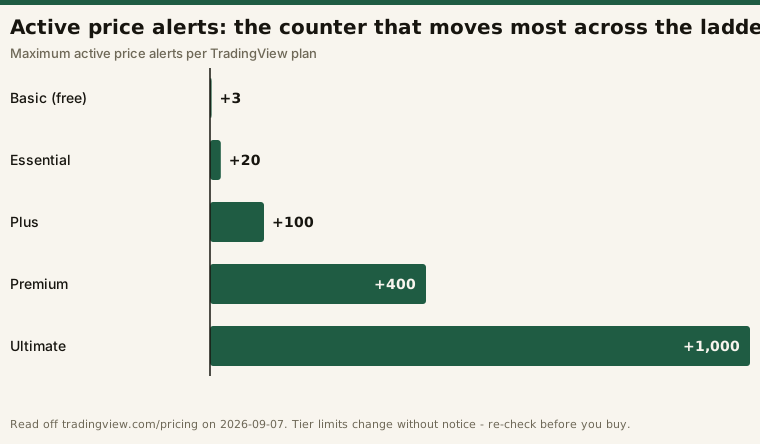
| Active price alerts | 20 | 100 | 400 | 1,000 |
| Symbols per watchlist | 1,000 | 1,000 | 1,000 | 1,000 |
| Historical bars | 10K | 10K | 20K | 40K |
| Free trial | 30 days | 30 days | 30 days | 14 days |
All four paid tiers share the things Basic simply does not have: no ads, chart data export, bar replay, custom time intervals, and second-based intervals.
On watchlists, read the grid carefully — it carries two separate rows and they do not say the same thing. Symbols per watchlist runs 30 / 1,000 / 1,000 / 1,000 / 1,000 across the five tiers: a 33x jump at the first paid tier that never moves again. Number of watchlists publishes a figure for Basic only — 1 — and the four paid-tier cells on that row are blank. A blank cell is not a published number, so how many separate lists a paid plan allows is a question the pricing page does not answer, and this page will not answer it either. Alerts are published as a count of active alerts, not of alert lists; no per-tier alert-list count appears anywhere on the page.
One caution on those prices. They are the annual-billing figures — the “per month billed annually” rate. The month-to-month price sits behind a toggle on the same page and is higher; Essential’s “save $24 a year” line is the vendor’s own statement of the gap. If the monthly rate is what you would pay, read it off the toggle yourself rather than trusting any published figure, this one included: TradingView.
The three boundaries that actually bite
Basic’s limits rarely bind all at once. Which one binds first is a function of how you work, so the useful question is not which cap is tightest in the abstract but which sits across your own routine.
Alerts: three is the cliff
Three active price alerts is the tightest constraint on the free tier by a distance, because alerts are how a screener’s output becomes something you can act on later. A screen produces a snapshot; an alert watches a level while you do something else. Three covers one or two positions plus a level you are waiting on, and nothing more. The entry paid tier moves that counter to 20; above it, 100, 400 and 1,000. Whether the 3-to-20 step is worth paying for depends on how many levels you need watched at once.
Charts and watchlists: one screen, thirty names
One chart per tab and a single 30-symbol watchlist define a way of working: one thing at a time, from a short list. That is fine for a swing trader reviewing a handful of names in the evening. It falls apart the moment you need the same symbol on two timeframes side by side, or a sector list kept separate from a position list — on Basic all of that fits inside one list of thirty names.
The symbol cap is a wall, not a slope: 30 on Basic, 1,000 on every paid tier, with no further movement above the first one. It is the single Basic limit that spending more will not improve. On the separate question of how many lists you get, the grid publishes a number for Basic alone.
History: 5K bars
Five thousand bars sounds like a lot until you divide it by an interval. It is one number, but what it costs you depends entirely on the timeframe you work on:
| Chart interval | Bars in one regular US session | How far back 5K bars reaches |
|---|---|---|
| 1-minute | 390 | ~13 sessions |
| 5-minute | 78 | ~64 sessions |
| 15-minute | 26 | ~192 sessions (~9 months) |
| Daily | 1 | ~5,000 sessions (~20 years) |
That table is our arithmetic, not a vendor claim — only the 5K comes from the pricing page:
# Illustrative: what a 5,000-bar cap buys at each interval.
SESSION_MINUTES, SESSIONS_PER_YEAR, CAP = 390, 252, 5000
for label, minutes in [("1m", 1), ("5m", 5), ("15m", 15)]:
    print(label, round(CAP / (SESSION_MINUTES / minutes)), "sessions")
print("1d", round(CAP / SESSIONS_PER_YEAR, 1), "years")   # -> 19.8
The cap is silent: it announces itself only at the left edge of the chart, where the series simply stops. Essential and Plus raise it to 10K, Premium to 20K, Ultimate to 40K. Those top two tiers also carry something the counters do not show — TradingView’s Creator Program requires an active Premium or Ultimate plan before a script author can apply to sell scripts. A second thing the counters do not show sits outside the grid entirely: the beta AI Chart Copilot extension meters a weekly allowance that scales with whichever tier you hold.
If your method tests a rule across a long history, note that this cap and Basic’s missing chart data export compound: you can neither see far enough back nor take the series elsewhere.
The paywall that isn’t a tier: real-time exchange data
This is the part that surprises people, and it is stated on the pricing page itself: “All extra real-time and intraday data for exchanges — NASDAQ, NYSE, NYSE ARCA, OTC, CME, etc. — are available to be added separately to your account.”
Two things follow. First, real-time US exchange data is a separate purchase, not something a higher tier bundles in — moving from Essential to Premium raises your chart and alert counters and does not by itself change what your quotes cost. Second, the page states that “Extra real-time data is only available on the TradingView website and only for users who purchased the data from eligible exchanges with their paid TradingView account” — so it requires a paid plan underneath it and is scoped to the web product.
For end-of-day or swing work this is a non-issue: delayed data is fine for reviewing yesterday’s close. If your decisions depend on the current print, it is the real cost line and it sits outside the tier comparison entirely. Budget the subscription and the data as two items, or you will price the stack wrong. (Exchange fees are set by the exchanges, not by TradingView, so this page quotes none.)
Which boundary hits you first
A rough mapping, stated as capacity rather than advice:
- Learning the charts, a few names, no live decisions. The ads, not the counters.
- Swing trading a real watchlist. The three-alert cap and the 30-symbol list.
- Multi-timeframe or intraday work. Custom and second-based intervals — a yes/no, not a counter.
- Long history, or exporting a series. The 5K bar cap and the missing export.
- Live intraday decisions. Not the tier at all: the separately purchased real-time data.
That last mapping decided our own tier. This desk opened a 30-day trial on Essential on 2026-08-23 because the method uses 65-minute charts alongside daily ones and custom intervals are absent from Basic — the tier was forced by the protocol, not chosen. What the paywall feels like in daily use is not something this page claims: the trial’s in-platform track has no entries yet, so everything above is the published grid read carefully. The lived version goes on the review page.
Frequently asked questions
Is TradingView’s free plan actually usable?
Yes, for one chart at a time and a short list. The charting itself is not restricted; the counters around it are.
Does a paid plan give me real-time data?
Not automatically. The pricing page states that real-time and intraday exchange data are added to your account separately, and that the purchase requires a paid TradingView account.
How many watchlists do you get on each TradingView plan?
The pricing page answers that for Basic only, where it lists 1. The paid-tier cells on the “Number of watchlists” row are blank, so no list count is published for Essential, Plus, Premium or Ultimate. What the grid does publish for every tier is the symbol ceiling per list: 30 on Basic, 1,000 on all four paid tiers.
How many price alerts does each tier allow?
Three on Basic, then 20 on Essential, 100 on Plus, 400 on Premium and 1,000 on Ultimate — the counter that scales furthest across the ladder.
Which tier removes the ads?
All of them — ad-free browsing starts at the entry paid tier.
Can I try a paid tier first?
The pricing page lists a 30-day free trial on Essential, Plus and Premium, and 14 days on Ultimate. The trial converts to the paid plan you selected unless you cancel first; how the auto-renewal and cancellation work has the timing and refund rules.
Disclosure: this page contains affiliate links. If you subscribe through one, this site may earn a commission at no additional cost to you. It does not change the figures above — all of them are quoted from TradingView’s own pricing page and dated.
This is educational content, not financial advice. Choosing a software tier is a budgeting decision, not a trading one.