TradingView Free Trial Auto-Renew: It Converts to Paid on Its Own, and How to Cancel in Time
TradingView's free trial auto-renews into the paid plan you picked unless you cancel first. Our desk's trial converted: the timing and refund rules.
Yes, TradingView’s free trial auto-renews. Unless you cancel before it expires, the trial becomes the monthly or annual paid plan you selected, and TradingView charges you at the end of the trial. Our desk’s 30-day Essential trial did exactly that in September 2026. This page covers when the charge lands, how to cancel on the web and in the app stores, and what TradingView’s own pages say about refunds (two of them disagree).
Every vendor statement below was read on TradingView’s own pages on 29 September 2026: the Terms of Service at tradingview.com/policies/, the pricing page, and the Help Center billing articles. Billing terms change, so check them yourself before you rely on a date.
What the terms actually say
The rule is in section 13 of TradingView’s Terms of Service:
“Unless cancelled before the trial expires, the subscription will automatically convert to the monthly or annual paid plan selected by the user, and the applicable subscription fee will be charged at the end of the trial period.”
Three other sentences from the same vendor decide how this works in practice:
| Rule | TradingView’s wording | Where it’s stated |
|---|---|---|
| Trial conversion | “will automatically convert to the monthly or annual paid plan selected by the user” | Terms of Service, s.13 |
| Who has to cancel | “An email request or support ticket asking for your subscription to be cancelled is not considered cancellation.” | Terms of Service, s.13 |
| Cancelling a trial | “A canceled trial will stop immediately after cancellation.” | Pricing page FAQ |
| One trial per user | “It is only possible to use the trial period once.” | Terms of Service |
| Trial lengths | “Try free for 30 days” (Essential, Plus, Premium); “Try free for 14 days” (Ultimate) | Pricing page |
The third row is the catch. A paid subscription you cancel stays active until the next due date, but a trial you cancel ends right away. Cancelling on day 2 to be safe gives up the other 28 days. And because the trial can only be used once, you won’t get it back. TradingView’s Help Center says an account flagged as having had a trial is offered a paid plan instead.
What happened on our desk
Our desk opened TradingView’s Essential trial on 23 August 2026 to run a 30-day pre-committed tool trial. The trial ended on 22 September. Nobody cancelled it, and on 23 September the owner logged a TradingView charge: the trial had auto-converted to a paid monthly Essential subscription, running through about 22 October.
| Date (2026) | Event |
|---|---|
| 23 Aug | Essential free trial starts (30 days) |
| 22 Sep | Trial period ends |
| 23 Sep | Owner logs the charge: the trial auto-converted to paid monthly Essential |
| ~20 Oct | Desk’s keep-or-cancel decision, set before the next renewal |
| ~22 Oct | End of the first paid month |
The desk was measuring TradingView anyway, so the conversion didn’t interrupt anything: the webhook rig from the alert latency trial kept running after the trial ended and logged full 390-alert sessions on 22 and 23 September. It then recorded zero alerts for the 24, 25 and 28 September sessions; as of 29 September the cause hadn’t been established, and it isn’t attributed to TradingView. Either way, the conversion was a real charge, made with no action from us, which is exactly how the terms say it works. The keep-or-cancel decision hasn’t been made yet. It will be logged around 20 October, and the TradingView review is where the verdict goes.
How to cancel a TradingView trial
The answer depends on where you started the trial, not on which device you’re using now.
If you started it on the TradingView website
TradingView’s Help Center gives the path as Settings and billing → Subscriptions → Cancel trial, a single click. The Terms of Service say to cancel “by visiting the billing section of your Settings page”, and you are “solely responsible for properly cancelling” it. Emailing support doesn’t count.
If you started it in the iOS or Android app
TradingView’s Help Center says subscriptions bought through the mobile apps can’t be managed on the website, and that auto-renewal for them is cancelled “in the corresponding store”: cancel through Apple’s subscription settings on iPhone, or through Google Play on Android (Google Play also lets you pause instead of cancelling). The website’s cancel button won’t touch an app-store subscription.
This is the practical reason to start a trial on the web if you’re unsure whether you’ll keep it. The cancel button is on your TradingView account page, and a refund request goes to TradingView itself. App Store purchases, by contrast, can only be refunded by Apple (more on that below). It’s also where our commission comes from; see the disclosure at the end.
When to cancel: the date arithmetic
TradingView’s trial page doesn’t state a cut-off time before expiry. Because a cancelled trial stops immediately, the only way to keep the full trial is to cancel near the end, which makes the timing easy to get wrong. The calculation is simple enough to do before you start:
# Illustrative: work out the dates on day one and put them in a calendar
from datetime import date, timedelta

trial_start  = date(2026, 8, 23)                     # our desk's Essential trial
trial_days   = 30                                    # Essential / Plus / Premium; Ultimate is 14
trial_end    = trial_start + timedelta(days=trial_days)   # 2026-09-22
cancel_by    = trial_end - timedelta(days=1)              # 2026-09-21: a day's margin, our choice

# If the charge has already landed, the Terms of Service window for a MONTHLY plan
# counts from the payment date. Take that date from your receipt; the ToS says the
# fee is charged "at the end of the trial period", so assume the trial end date:
charge_date  = trial_end                             # use your receipt's date
refund_until = charge_date + timedelta(days=7)            # 2026-09-29 (annual plans: 14 days)
The one-day margin is our own choice, not a TradingView rule. It covers time zones and the trial ending partway through a day. The cost of that margin is one day of trial: because “a canceled trial will stop immediately after cancellation,” access ends the moment you cancel, not at the end of the day.
Already charged? The refund rules, and a contradiction
TradingView has a Help Center article for this exact case, titled “I have been automatically charged after my trial and want a refund.” It says: “In principle, we don’t provide refunds outside the specified refund windows,” but also “We take specific user circumstances into account and can issue refunds in line with these circumstances,” and it tells you to contact the Support Team.
The windows themselves are in the Terms of Service:
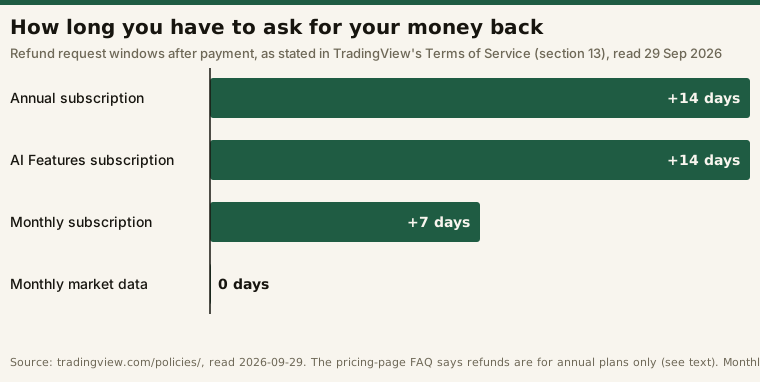
The pricing page FAQ says something different. It reads: “Refunds are available for annual plans only and must be requested within 14 calendar days of payment.” Read on the same day, the two first-party pages disagree on whether a monthly plan can be refunded at all:
| Source (read 29 Sep 2026) | Monthly plan refund |
|---|---|
| Terms of Service, s.13 | “available only if requested within 7 calendar days after the payment is made” |
| Pricing page FAQ | “Refunds are available for annual plans only” |
We can’t tell you which one TradingView’s support team applies. What both pages agree on is that time matters. If a trial converts and you don’t want the plan, ask immediately. At the latest, ask inside the Terms of Service’s 7-day monthly window, or 14 days for an annual plan.
App-store purchases follow the store’s rules. Per the same Help Center article, “App Store purchases can be refunded only by the store,” while for Google Play “you can request a refund both in the store and on our platform.”
What a paid Essential month buys
If the trial converts and you keep it, you’re paying for the tier you trialled. What each tier unlocks, and at what price basis, is covered in TradingView free vs paid. One caution from that page applies here: the headline prices on TradingView’s pricing page are labelled “billed annually.” A trial that converts to a monthly plan, as ours did, bills at the month-to-month rate, which the pricing page shows behind a separate toggle.
If you want to start a trial, do it on the web version of TradingView’s website, where the cancel button and the refund conversation are both in your account.
Frequently asked questions
Does the TradingView free trial automatically renew?
Yes. TradingView’s Terms of Service say that unless you cancel before the trial expires, it converts to the monthly or annual paid plan you selected and the fee is charged at the end of the trial. Our desk’s Essential trial ended on 22 September 2026 and converted to a paid monthly plan; the owner logged the charge on 23 September.
How long is the TradingView free trial?
The pricing page lists 30 days for Essential, Plus and Premium, and 14 days for Ultimate (read 29 September 2026). Each user gets one trial.
If I cancel the trial early, do I keep access until it ends?
No. The pricing page FAQ says “A canceled trial will stop immediately after cancellation.” That differs from a paid subscription, which stays active until the next due date after you cancel.
How do I cancel a TradingView trial I started on my phone?
Through the App Store or Google Play, not the TradingView website. TradingView says subscriptions bought in the mobile apps can’t be managed on the website.
Can I get a refund after the trial charges me?
Possibly. TradingView says it considers individual circumstances. Its Terms of Service give 7 calendar days for monthly plans and 14 for annual, but its pricing page says refunds are for annual plans only. Contact support as soon as you see the charge.
Does this site earn money if I subscribe?
Yes. TradingView pays us a flat commission per plan when a new subscriber who came through our link buys a paid plan on the TradingView website. Its partner rules say its desktop and mobile apps are not part of the program. Its partner page also says that if a referred reader starts a trial, the window for crediting us “extends by another 90 days once the trial ends.” Our desk’s own subscription was paid for by the desk, not provided free.