Free Trading Journal Limits: Caps, Imports and the Export Lock-In
Free trading journal limits sit on the way in (import caps, manual entry) and the way out (export). What each free plan allows, read off vendor pages.
A free trading journal is limited in two places: how your trades get in, and whether they can get back out. On the vendor pricing pages we read on 2 October 2026, free plans capped imports (30 orders a month at Trademetria, 3,000 stock executions a month at TradesViz) or required manual entry (Stonk Journal), and none of them listed trade export on the free plan. The price is zero. What it costs you is the ability to leave with your own record.
That’s the test this page applies. Ranked “best free journal” lists count features. The useful question is narrower: if you spend six months journaling on a free plan, can you take those six months with you?
The three limits that matter on a free plan
Every free tier we read draws its line on one of three axes:
- The cap. How many trades, orders or executions a month the free plan accepts, and how many accounts.
- The way in. Whether the free plan syncs with or imports from your broker, or makes you type each trade.
- The way out. Whether you can export your trades and notes, and on which plan.
The first two decide whether the free plan fits your trading. The third decides whether it’s really free, because a journal you can’t leave charges you later, when the history you’ve built is the thing you’d lose.
What each free plan allows, from the vendor’s own page
Every cell below was read on the vendor’s own pricing page on 2 October 2026, using the vendor’s wording; the one exception is Tradervue’s free-plan cap, which isn’t on its pricing page and comes from Tradervue’s own help center, read 5 October 2026. Where a vendor’s own pages don’t state something, the cell says so; we haven’t filled gaps from third-party reviews. We have no relationship with any vendor on this page, and none of the links is an affiliate link.
| Vendor (free plan) | Monthly cap on free | Accounts | Way in on free | Export on free | Cheapest paid plan (monthly billing) |
|---|---|---|---|---|---|
| TradesViz (Basic) | 3,000 executions/month, stock only | 1 | “Auto-sync trades” marked on Basic | “Export Management” marked on Pro and Platinum only | Pro, $19.99/mo ($14.99/mo billed annually) |
| Trademetria (Free Plan) | “Import up to 30 orders a month”; up to 3 open positions | 1 | “Broker auto-sync” marked not included | “Export your trades” marked not included | Basic, $19.95/mo ($169 billed yearly) |
| Stonk Journal (Free) | “No trade caps” | “Unlimited trades & accounts” | “Fast manual entry”; CSV import is a Pro feature | Not mentioned on the page | Pro, $10/mo |
| TradeTally (Free) | “Unlimited free trade storage” | Not stated | Not stated | Not stated | No price on the page |
| Tradervue (Free) | 30 trades/month (“grouped trades, not the individual executions”), per its help center; not on the pricing page | Not stated for free | Not stated for free | “Download/ Export to Excel” listed under Silver and Gold | Silver, $29.95/mo |
| TradeZella | No free plan or trial mentioned | — | — | Export not mentioned on the page | Essential, $35/mo ($315/yr) |
Two vendors in that table publish less than you’d expect on their pricing pages. Tradervue’s only compares Silver and Gold. The free plan shows up in a “Sign Up For Free” button and in the trial terms, which say your card is charged when the trial ends “unless you switch to a free plan before the end of the trial period”, but none of its limits are listed there. The cap is documented elsewhere: Tradervue’s help center states that “Users on the free plan have a monthly import limit of 30 trades”, counted as grouped trades, and that Silver and Gold have “no limit on the number of trades you can import.” TradeTally’s pricing page describes its free plan in a sentence and lists no limits or prices.
Edgewonk sells only a paid plan with a 14-day money-back guarantee, so it’s out of scope here. Its page also showed two different prices for the same plan ($197 per 12 months in one place, $169 in another) when we read it, so check at checkout.
The way out costs about $20 a month
On the three pricing pages that say where export lives, it’s never on the free plan:
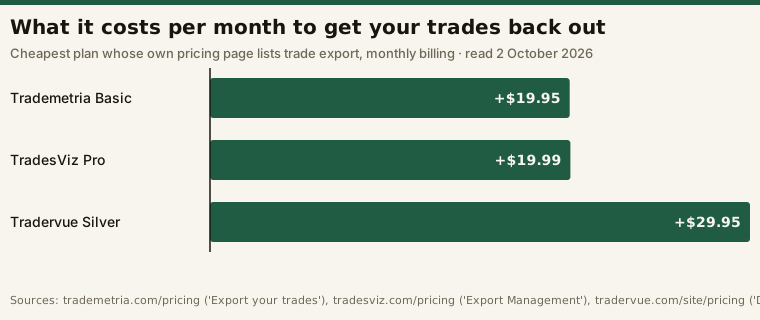
That isn’t a scandal. Vendors have to put the paywall somewhere. But it changes what “free” means. If export is a paid feature, the free plan works like a trial with no end date: your history piles up on a platform you can only leave by paying first, or by leaving the history behind. The longer you stay, the more that exit costs you, even though nothing ever appears on a bill.
Stonk Journal is a different shape. Its free plan has no trade cap, but the way in is manual: the page says “Free: fast manual entry”, with broker CSV import on Pro. That’s a fair trade if you take a few trades a week. Typing in a day trader’s fills by hand is a cost of its own, and every hand-typed trade is a chance for a typo.
Check the cap against your own month
Caps aren’t counted in the same unit. TradesViz counts executions, Trademetria counts orders, and Tradervue counts grouped trades (an entry and its exit together). One order that fills in three pieces can be three executions. So work out your own month in all three units before you decide a cap is generous:
# Illustrative: does a free plan's monthly cap hold one month of your trading?
round_trips_per_day = 4      # one entry plus one exit per round trip
fills_per_order     = 2      # partial fills: one order often prints as several executions
trading_days        = 21

trades     = round_trips_per_day * trading_days        # 84 grouped trades
orders     = round_trips_per_day * 2 * trading_days    # 168
executions = orders * fills_per_order                  # 336

caps = {"Tradervue Free (grouped trades)": (30, trades),
        "Trademetria Free (orders)": (30, orders),
        "TradesViz Basic (executions)": (3000, executions)}
for plan, (cap, used) in caps.items():
    print(f"{plan}: {used}/{cap} -> {'fits' if used <= cap else 'over the cap'}")
# Tradervue Free (grouped trades): 84/30 -> over the cap
# Trademetria Free (orders): 168/30 -> over the cap
# TradesViz Basic (executions): 336/3000 -> fits
At that pace, a 30-order cap runs out on the fourth trading day and a 30-trade cap during the eighth, while the 3,000-execution cap has plenty of room. A swing trader placing a dozen orders a month fits under either. Before you rely on a cap, run your own numbers from a real month of broker statements. Also check the asset row: TradesViz Basic is stock-only, so an options trader is over the free plan on the first trade, whatever the count.
A sourcing trap in the comparison tables
Free-tier caps are some of the most-copied and least-checked numbers in this category, and some of the tables that circulate are published by a vendor about its rivals. TradesViz’s own pricing page carries a comparison grid with competitor free-tier import limits (“Free: 200/mo”, “Free: ?”, “Free: 30/mo”), but the columns are labelled only “Competitor 1”, “Competitor 2” and “Competitor 3”. A cap you can’t attribute to a named vendor’s own page can’t be checked, so it isn’t in our table. The same goes for figures in head-to-head comparison pages written by one of the two products being compared.
The exit test, before you commit
Run this in your first week on any journal, free or paid, while there’s little history to lose:
- Import a week you know well and check the trade count, net P&L and fees against your broker statement. (Our journaling guide explains why the record has to be right before anything else matters.)
- Write one entry note and one tag the way you normally would.
- Try to get it all back out. Look for an export that includes the notes and tags, not just the executions. Your broker already has the executions, so what you’d actually lose is your notes and tags.
- If export is paid, decide now. Either budget for the paid plan, or keep your notes somewhere you control (a spreadsheet or a plain text file) and treat the journal as an analysis layer on top of it.
The same rule applies to screeners: upgrade when a specific limit blocks a real job, not because the paid tier has more. For where the journal sits in the full workflow, see the screener, chart and journal stack.
Frequently asked questions
Is there a completely free trading journal with no limits?
Not on the pages we read on 2 October 2026. Stonk Journal’s free plan has “no trade caps” but makes you enter trades manually, and TradeTally advertises “unlimited free trade storage” without listing its other limits. Every free plan that published its terms restricted something, whether the cap, the import method or the export.
Can I export my trades from a free trading journal?
On the pricing pages that say, no. TradesViz marks “Export Management” on Pro and Platinum only, Trademetria marks “Export your trades” as not included on its free plan, and Tradervue lists export under its paid Silver and Gold plans. Check the vendor’s current page before you start building a history.
What is the TradesViz free plan limit?
TradesViz’s pricing page, read 2 October 2026, lists its Basic plan as “Free forever” with an import limit of 3,000 executions a month, stocks only, and one trading account.
Does Tradervue have a free plan?
Yes. Its pricing page refers to one, in a “Sign Up For Free” link and in trial terms that let you “switch to a free plan” before a paid trial charges your card, but doesn’t list its limits. Tradervue’s help center does: the free plan has a monthly import limit of 30 trades, counted as grouped trades rather than individual executions, while Silver and Gold have no import limit.
Does TradeZella have a free version?
Its pricing page, read 2 October 2026, mentions no free plan or free trial. The cheapest plan listed was Essential at $35 a month, or $315 billed yearly.
Every price, cap and feature above was read on each vendor’s own pricing page on 2 October 2026 (Tradervue’s free-plan cap on its help center, 5 October 2026) and is quoted in the vendor’s wording. Plans change without notice, so check the live page before relying on any figure. We have no affiliate or other relationship with any vendor named here, and no vendor reviewed this page.
This is educational content about software, not financial advice.