Pine Script vs No-Code Backtesting: Which One Fits How You Trade
Pine Script vs no-code backtesting is a choice of method, not product: what each one lets you express, where each hits its ceiling, and how to pick.
Choose no-code backtesting if your rules can be built from standard indicators and conditions and you’d rather not learn a language; choose Pine Script if your rules need state, custom logic or data handling that no dropdown offers, and you’re willing to learn a language to get it. Neither is more rigorous than the other. Rigour comes from how you test, not from the interface you test in.
This page compares the two approaches, not products. If you’ve already decided on no-code and want to know what the tools and their pricing tiers actually gate, that’s covered in no-code backtesting software. The question here comes first: which of the two should you be learning?
The real difference is who writes the rule down
Pine’s engine, as TradingView documents it, steps through historical bars, runs your script on each one, simulates orders with a broker emulator and records the result. A no-code builder runs its vendor’s own engine, and how it simulates fills is something to look up in that vendor’s documentation rather than assume. Either way, the difference this page is about is how the rule gets into the engine.
- No-code: you put the rule together from building blocks the vendor designed. Anything those blocks can express is quick to test. Anything they can’t express, you can’t test at all.
- Pine Script: you write the rule in TradingView’s scripting language. It’s slower to start, but the limit is what the language and its data can do, not a vendor’s menu.
So the useful question isn’t “which is better”. It’s “does my rule fit inside someone else’s building blocks?” A moving-average cross, an RSI threshold or a breakout above an N-bar high are built from standard indicator conditions. Compare: “Only take the second signal after a losing trade.” “Scale out a third at 1R and trail the rest.” “Skip entries in the first 15 minutes after a gap.” Rules like these carry state from one bar or trade to the next. Whether a given builder can express them is something to check against its block list before you commit, not after.
Where each approach wins
| Decision factor | No-code builder | Pine Script |
|---|---|---|
| Rules it can express | Whatever the vendor’s blocks cover | Anything the language and chart data support |
| Stateful logic (after a loss, after N signals) | Only if the vendor offers a block for it | Native: variables persist across bars |
| Auditability | The configuration screen | The source code, line by line |
| Portability | Locked to the vendor | Locked to TradingView, but readable anywhere |
| Cost of a bad question | Very low, so easy to over-test | Low, and also easy to over-test |
| Who moves the ceiling | The vendor’s product roadmap | The language’s release cycle, plus your own skill |
The last two rows matter most. Both approaches make it cheap to test one idea twenty ways until one version looks good. The discipline that guards against that (count your attempts, hold out data, set costs pessimistically) is laid out in how we validate a strategy, and it applies to both approaches equally.
The coded ceiling keeps moving
The strongest practical argument for Pine is that its limits get raised on a schedule you can check. Pine Script v6 is the current version of the language. It launched in November 2024, and there is no v7. Every update since then has gone into v6, and TradingView documents each one in dated monthly sections of its release notes:
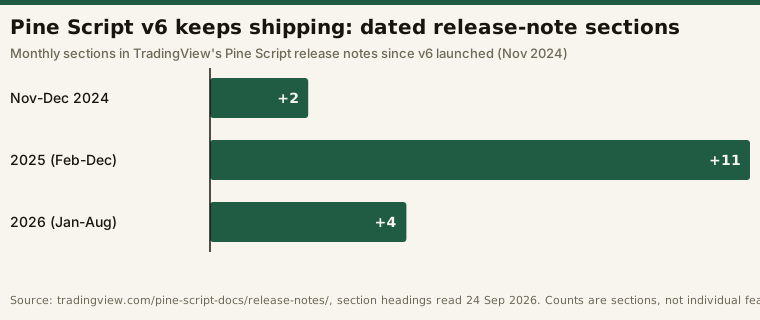
Several of those additions are directly about backtesting. They come from TradingView’s own release notes, read on 24 September 2026:
| Release-note section | Addition relevant to backtesting |
|---|---|
| November 2024 | Pine Script v6 released, with dynamic request.*() calls and strict boolean typing; strategies no longer stop at the 9,000-trade limit outside Deep Backtesting, they trim the oldest orders |
| December 2024 | Change to how strategy.exit() handles absolute and relative exit levels |
| February 2025 | New bid and ask variables (real-time, on the “1T” timeframe) |
| July 2025 | active parameter on every input*() function |
| January 2026 | request.footprint() and new footprint / volume_row types for volume footprint data |
| July 2026 | Strategy calc_on_every_history_tick parameter; new Script execution and Bar detalization options in strategy settings |
A no-code builder’s features also change, but on the vendor’s schedule and within the vendor’s choice of blocks. Pine’s new capability isn’t open to every account, though. Per TradingView’s release notes and Strategies page (read 28 September 2026), the footprint functions are for “Programmers who have a Premium or Ultimate plan”, the “On history bar tick” setting behind calc_on_every_history_tick “is available only to users who have a Premium or Ultimate plan”, and higher historical bar detail is likewise limited to Premium and Ultimate. bid and ask only work on the 1T timeframe. Check your plan before building a test around a new feature.
The 9,000-trade line, read correctly
One of these changes is often summarised online as “Pine removed the 9,000-trade limit”. That isn’t what the release note says. Since the v6 launch in November 2024, a strategy that reaches the limit without Deep Backtesting mode “no longer stop[s] calculating and raise[s] an error”. Instead, it “trim[s] the oldest orders to make space for new ones.” TradingView’s strategy documentation adds that on the default testing range, a strategy “preserves individual data for up to the latest 9000 trades”, and that Deep Backtesting keeps trade data for all trades.
The practical effect is that a high-frequency rule doesn’t fail with an error any more, and the simulation itself is unchanged: per the release note, trimmed orders “are not visible in the strategy report, but that does not change the strategy’s simulation”, and the Strategies page says trimming “does not affect the data displayed in the ‘Metrics’ tab”. What you lose is trade-by-trade detail for the oldest trades: the list of trades, CSV exports and the per-trade strategy.closedtrades.*() values. Whether that affects you depends on how often your rule trades:
# Illustrative arithmetic, not a TradingView calculation.
# How many years of trade-by-trade history fit in the latest 9,000 trades?
TRADE_CAP = 9_000
SESSIONS_PER_YEAR = 252

for label, trades_per_session in [("daily swing rule", 0.2),
                                  ("5-minute intraday rule", 3),
                                  ("1-minute scalping rule", 12)]:
    per_year = trades_per_session * SESSIONS_PER_YEAR
    print(f"{label:24s} {per_year:7.0f} trades/yr -> "
          f"{TRADE_CAP / per_year:6.1f} years retained")

# daily swing rule              50 trades/yr ->  178.6 years retained
# 5-minute intraday rule       756 trades/yr ->   11.9 years retained
# 1-minute scalping rule      3024 trades/yr ->    3.0 years retained
A swing trader will never hit this limit. A scalper will find that the trade list only covers about the last three years unless Deep Backtesting is on. The headline metrics still cover the full run, but you can’t inspect individual trades from the early part of the sample.
What both approaches inherit: the simulator’s assumptions
Choosing between code and no-code doesn’t change one assumption that can decide a backtest’s verdict on its own: the assumed fill price. Pine’s documentation is unusually explicit about its broker emulator. With default calculation behaviour, an order placed during a bar fills “at the open of the following bar.” On historical bars, the emulator only knows each bar’s open, high, low and close, so it assumes a path: “If the opening price of a bar is closer to the high than it is to the low, the emulator assumes that the market price moved in this order: open → high → low → close.” Strategy settings can partly address this. Since July 2026, the Bar detalization menu (which, per the release notes, “replaces the Bar Magnifier feature”) offers a High option, and high historical detail pulls prices from lower-timeframe bars “to increase the number of ticks available for estimating price action and filling orders on historical bars.”
Code has a real advantage here: you can write the costs into the strategy itself, so every run and every reader sees them. The example below is a minimal Pine v6 strategy with commission and slippage stated in the declaration. It shows syntax only and is not a strategy recommendation:
//@version=6
// Illustrative only: shows cost settings in the declaration, not a tradeable rule.
strategy("SMA cross, costs stated", overlay = true,
     commission_type  = strategy.commission.cash_per_order,
     commission_value = 1.0,   // $1 per order
     slippage         = 1)     // 1 tick added to market and stop order fills (limit fills are not slipped)

fast = ta.sma(close, 20)
slow = ta.sma(close, 50)

if ta.crossover(fast, slow)
    strategy.entry("Long", strategy.long)
if ta.crossunder(fast, slow)
    strategy.close("Long")
A no-code builder may give you the same settings in a panel. What matters is whether they’re visible, and whether you set them to pessimistic values. In our own research, one QQQ put-credit-spread configuration (a fixed-width vertical, 30–45 DTE, 0.16 delta, ThetaData end-of-day option bid/ask, 2020–2026) went from a profit factor of 1.18 with mid fills to 0.80 with taker fills, and the same comparison on SPY barely moved; the full tables are in options backtest fill assumptions. Backtest simulation — not live results, not a prediction, not advice.
When neither is the right tool
Both approaches are built around the data the platform supplies. Once a question needs data you bring yourself, you’ve outgrown both. That fill-assumption research needed historical end-of-day option bid and ask quotes, pulled from a local ThetaData terminal: data brought in from outside the platform rather than supplied by it. Bringing your own data also brings problems the platform used to handle for you, such as pre-inception padding and adjustment basis. Those are covered in what real data did to our backtests.
That’s the third option, and it’s worth knowing it exists before you commit. A general-purpose language like Python costs the most to learn and imposes the fewest limits.
A decision rule you can apply today
- Write your rule out in plain sentences, including exits and edge cases, before you open any tool.
- Try to build it in a no-code builder’s free tier or trial. If it fits exactly, with nothing approximated, stay there and skip learning a language.
- If you had to approximate any sentence, that’s your signal to switch to code. A backtest of an approximated rule tests a different rule from the one you’ll actually trade.
- If you’re going to use AI to write the Pine for you, read the code before you trust the output. The limits of a prompt-to-backtest loop are covered in the viral Claude trading bot playbook.
- Whichever you choose, state the costs and count your attempts. The interface doesn’t change what a backtest can prove.
Frequently asked questions
Is Pine Script hard to learn for a non-programmer?
It’s easier than a general-purpose language because it does one job: it runs a script once per bar on a chart. Many useful strategies fit in a few dozen lines, like the example above. The hard part is usually stating the rule precisely enough to code, and that’s worth doing whichever approach you choose.
Is there a Pine Script v7?
No. As of TradingView’s release notes read on 24 September 2026, the current version is Pine Script v6, released in November 2024. Every update since then has been added to v6.
Does Pine Script still have a 9,000-trade backtest limit?
Partly. Since Pine Script v6 launched in November 2024, strategies that reach 9,000 trades outside Deep Backtesting no longer stop with an error. Instead they trim the oldest orders, so the trade list keeps the latest 9,000. According to TradingView’s documentation, Deep Backtesting keeps trade data for all trades.
Are no-code backtests less accurate than Pine Script backtests?
Not inherently. Accuracy depends on the data, the fill assumption and the costs you set, and both approaches can be configured well or badly. Code’s advantage is expressiveness and an auditable record of exactly what was tested, not accuracy.
Should I learn Pine Script or Python for backtesting?
Start with the one your data allows. If TradingView’s chart data covers your question, Pine is the shorter path. If you need your own data, such as historical options quotes, you’ll need a general-purpose language eventually.