TradingView's Official MCP Server: Which Plans Get It and What Its 35 Tools Can and Can't Do
TradingView's official MCP server is in beta for Essential and up. Its 35 tools read data and edit watchlists and alerts, but none trades or sets webhooks.
TradingView now runs its own MCP server, in public beta since 16 September 2026, and only paid plans from Essential upward get it. Trial plans don’t. Its 35 tools read quotes, bars, screener results, news, fundamentals, filings and calendars. Ten of them can also create, change or delete your watchlists and price alerts. None of them places an order, and the server can’t create indicator-based alerts or webhook alerts.
This page is a dated reading of TradingView’s own pages, not a test. This desk never connected to the server, and the paid Essential plan it would have needed was cancelled on 2026-11-01. Everything below comes from first-party pages read on 2 November 2026 and re-read on 6 November 2026: the docs page at tradingview.com/mcp/docs, TradingView’s own launch post on its blog (published 16 September 2026, edited since), and the pricing page.
Before that launch, “TradingView MCP” meant unofficial community projects. Our desk test evaluated two of them and installed and ran one, and it’s the history of that route. As of that post’s 3 September update, neither project it covered was TradingView’s own. An official server exists now.
Which TradingView plans include MCP access
The docs page says it in one line: “Included in Essential and above; trial plans don’t include MCP access.” The launch post’s title says only “public beta available for paid plans”. The free Basic plan isn’t mentioned as included anywhere, so on these pages it’s out.
The entry price is Essential, which TradingView’s pricing page showed on 6 November at $12.95 a month billed annually, the page’s default view. The same page put Plus at $29.95, Premium at $59.95 and Ultimate at $199.95 on the same basis. If you’re comparing tiers, the MCP gate is now one more line on the ladder we take apart in TradingView free vs paid. The plans are at TradingView.
Nothing on either page says a higher tier gets more MCP tools or a higher rate limit. As printed, the gate is a yes or no at Essential, with one small exception: the docs mark an update_alert option that removes an alert’s expiration as “(premium)”.
How you connect it
There is one server URL for every client, https://mcp.tradingview.com/mcp. Per the docs, “Authentication is OAuth 2.1 — you log in with your TradingView account, no API keys to manage.” The page gives setup steps for Claude (web, desktop and mobile), Claude Code, ChatGPT and Codex, Grok, Perplexity, Cursor, and “Other MCP clients” that support streamable HTTP with OAuth 2.1. The Claude Code command, verbatim from the docs, with the next step as a comment:
claude mcp add --transport http mcp-tradingview https://mcp.tradingview.com/mcp
# then run /mcp inside Claude Code and authorize with your TradingView account
OAuth matters more than it looks. There’s no API key to paste into a config file: per the setup steps, you sign in with your TradingView account in the browser and approve access, and that grant is what the assistant works from.
The 35 tools, group by group
The docs list nine tool groups and label every tool Read-only or Write. In TradingView’s words, “Read-only tools never modify the account; Write tools create, change or delete user data.” We tallied the labels as printed:
| Tool group | Tools | Read-only | Write | Limits stated on the docs page |
|---|---|---|---|---|
| Watchlists | 8 | 3 | 5 | Names up to 500 characters; symbols in EXCHANGE:TICKER format |
| Market data | 3 | 3 | 0 | get_ohlcv: “max 5000” bars per call, default 300 |
| Symbol search | 1 | 1 | 0 | Fuzzy search by ticker or company name |
| Screener | 5 | 5 | 0 | run_screener: “cap 1000” rows, default 100; batch quotes for “up to 50 symbols” |
| News | 2 | 2 | 0 | Up to 200 headlines per symbol, 25 per call by default |
| Fundamentals & forecasts | 3 | 3 | 0 | Snapshot, history and analyst consensus |
| Documents | 2 | 2 | 0 | 10-K, 10-Q, 8-K filings and earnings-call transcripts |
| Calendars | 3 | 3 | 0 | Economic calendar “data since 2003-09-01”, forward “~31 days” |
| Alerts | 8 | 3 | 5 | One simple price condition per alert; no webhooks |
| Total | 35 | 25 | 10 | Rate limit “~100 requests per minute per user” |
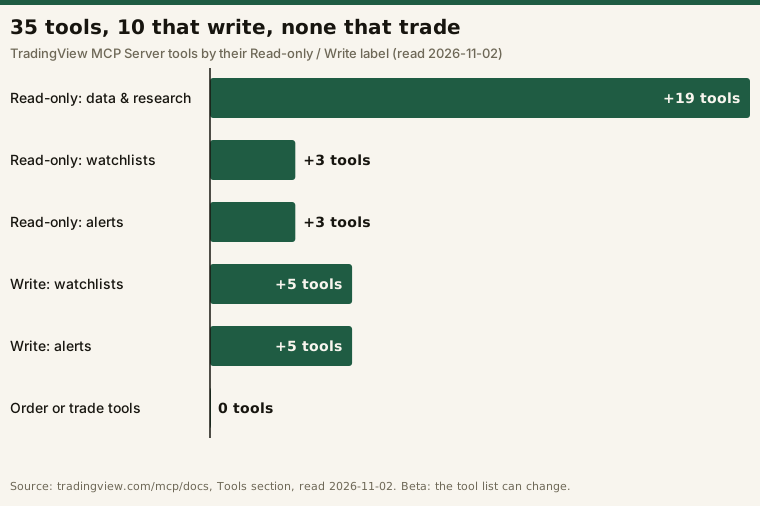
All ten write tools touch only two kinds of TradingView data: your watchlists and your alerts. The screener presets are worth a look too. run_screener takes named presets such as breakout_with_volume, oversold_healthy and new_highs, and it takes filters on fields like P/E, RSI and dividend yield.
One label is looser than it reads. get_active_watchlist is marked Read-only, but its description says that if no watchlist is active, “the first custom one is activated; if the user has no watchlists at all, a default one is created.” So a tool sold as read-only can still change which watchlist is active.
What the official server can’t do
It can’t trade
None of the 35 tools places, changes or cancels an order. None of them reaches a broker connection either. In the permission bands from our broker MCP servers explainer, this is a read-only data server, plus write access to two kinds of your own TradingView data. That makes it a different risk category from a broker server with order tools, where the model can make an order live.
Alerts: one price condition, no webhooks
create_alert supports “a simple price condition (price + cross/cross_up/cross_down/greater/less)”. The docs go on: “Multi-condition and indicator-based (study) alerts are NOT supported yet and are rejected with an explanatory error.” Webhooks are out as well: “Webhook alerts can’t be created through MCP: TradingView requires two-factor authentication to be verified before enabling webhooks, and this check isn’t available for MCP connections yet.”
The other alert tools carry related limits:
update_alertcan change an alert’s message, name, expiration and notifications, but “Conditions/symbol/timeframe can NOT be changed — delete and create instead.” Alerts that already have a webhook can’t be updated through MCP at all.get_alertsfilters out the message and webhook URL fields and returns ahas_webhookflag in their place.create_alertdefaults are an expiration of now+30 days, evaluation on the 1-minute resolution, mobile push on and email off.
Here’s the mismatch worth knowing about. Two of the example prompts in TradingView’s own launch post ask for alerts on a 50-day moving average cross and on 1-hour RSI dropping below 30. Those are indicator conditions, and the docs page, as read on 2 November, says the server rejects them. We haven’t run those prompts, so we can’t say what a given assistant does when the server refuses.
If your alerts end at a webhook, as on the rig behind our alert-delay measurements, the server can still read their fire history. get_alerts_log reports “webhook delivery status”. It can’t create or edit those alerts.
Delayed data and the rate limit
The docs page doesn’t say whether MCP market data is real-time or delayed. The launch post does: “For now we provide a scoped version: tool list is limited, market data is delayed, and some MCP tools may not work as smoothly as expected.” Neither page says how long the delay is or whether it varies by plan.
The docs give a rate limit of “~100 requests per minute per user”. On 2 November the launch post also said TradingView might limit requests per day, without a number. The post was edited on 6 November, that line is gone, and neither page now states a daily cap.
How far back the bars go
get_ohlcv takes a symbol, an interval, a bar count (“max 5000”) and a summary flag. The docs list no start date, end date or offset, so one call reaches at most 5,000 bars, and the docs describe no way to ask for an older window. Here’s what those printed limits work out to for a Claude Code script. It’s arithmetic, not a measured run:
# Illustrative arithmetic from limits printed on tradingview.com/mcp/docs (read 2026-11-02).
# Not a test: this desk has not connected to the server.
import math

MAX_BARS = 5000          # get_ohlcv: "Number of bars, max 5000"
BATCH = 50               # get_symbol_data_batch: "up to 50 symbols"
RATE_PER_MIN = 100       # "~100 requests per minute per user"

years_daily = MAX_BARS / 252          # ~19.8 years of daily bars in one call
sessions_1m = MAX_BARS / 390          # ~12.8 regular-hours US sessions of 1-minute bars

symbols = 500                          # an S&P 500-sized list
calls = symbols + math.ceil(symbols / BATCH)   # 500 bar pulls + 10 batch snapshots = 510
minutes_at_cap = calls / RATE_PER_MIN          # ~5.1 minutes at the per-minute cap
That works for daily research. For intraday history it’s tight: if the cap holds, 5,000 one-minute bars cover about 12.8 regular sessions, and the docs list no way to page further back.
What the gate means in practice
- You already pay for Essential or higher. The docs say MCP access is included in your plan; neither page lists a separate MCP charge.
- You’re on the free Basic plan. You’d need a paid plan first. Nothing on the docs page puts MCP access in Basic.
- You’re on a free trial. The docs exclude trial plans by name.
If what you want is an assistant that trades, this server isn’t that. If what you want is your TradingView data and alerts inside Claude, ChatGPT or a coding session, this is the official route, not a community project.
Frequently asked questions
Is there an official TradingView MCP server?
Yes. TradingView launched it as a public beta on 16 September 2026, according to its own blog. The server URL is https://mcp.tradingview.com/mcp, and the docs live at tradingview.com/mcp/docs. Earlier “TradingView MCP” projects are unofficial community software.
Which TradingView plans include MCP access?
Essential and every tier above it. The docs page says, “Included in Essential and above; trial plans don’t include MCP access.”
Can the TradingView MCP server place trades?
No. None of the 35 tools listed on 2 November 2026 places, changes or cancels an order. Its write tools only manage your TradingView watchlists and price alerts.
Can the TradingView MCP server create webhook alerts?
No. The docs say webhooks need verified two-factor authentication, and “this check isn’t available for MCP connections yet.” Indicator-based and multi-condition alerts are rejected too. Only a single price condition is supported.
Is TradingView MCP market data real-time?
TradingView’s launch post says that during the beta “market data is delayed”. Neither the post nor the docs page says how long the delay is.
How many requests can the TradingView MCP server handle?
The docs give about 100 requests per minute per user. Neither the docs page nor the launch post states a daily limit as of 6 November 2026.
Sources read 2 November 2026 and re-read 6 November 2026, first-party: tradingview.com/mcp/docs (the “TradingView MCP Server” page, labelled Beta), TradingView’s blog post “Bring TradingView to Claude with the new MCP Server: public beta available for paid plans” (published 16 September 2026), and tradingview.com/pricing. Tool counts and the Read-only / Write split come from the docs page as published on both dates. TradingView says the toolset “expands over time”, so re-check before relying on any count here.
Disclosure: this page contains an affiliate link. If you subscribe through it, this site may earn a commission at no additional cost to you. It doesn’t change anything stated above.
This is educational content about software tooling, not financial advice. No positions, signals, account values or trading results appear on this page.